Next Quick Tip #1 – Rimuovere i programmi inutilizzati

[et_pb_section admin_label=”section” transparent_background=”off” background_color=”#ffffff” allow_player_pause=”off” inner_shadow=”off” parallax=”off” parallax_method=”off” custom_padding=”||0px|” padding_mobile=”on” make_fullwidth=”off” use_custom_width=”off” width_unit=”on” custom_width_px=”1080px” custom_width_percent=”80%” make_equal=”off” use_custom_gutter=”off” fullwidth=”off” specialty=”off” disabled=”off”][et_pb_row admin_label=”row” make_fullwidth=”on” use_custom_width=”off” width_unit=”off” custom_width_px=”1080px” custom_width_percent=”80%” use_custom_gutter=”off” gutter_width=”3″ custom_padding=”||0px|” padding_mobile=”on” allow_player_pause=”off” parallax=”off” parallax_method=”off” make_equal=”off” column_padding_mobile=”on” parallax_1=”off” parallax_method_1=”off” parallax_2=”off” parallax_method_2=”on” parallax_3=”off” parallax_method_3=”on” parallax_4=”off” parallax_method_4=”on” disabled=”off”][et_pb_column type=”4_4″][et_pb_text admin_label=”Pre-Title” background_layout=”light” text_orientation=”center” text_font=”PT Sans|on|||” text_text_color=”#bcbcbc” text_letter_spacing=”2px” use_border_color=”off” border_style=”solid” custom_margin=”||0px|” custom_padding=”||0px|” disabled=”off”]

Sei sicuro che il tuo computer sia pulito e sotto controllo? Scopriamolo!

[/et_pb_text][et_pb_text admin_label=”Titolo articolo” background_layout=”light” text_orientation=”center” max_width=”800px” header_font=”|on|||” header_font_size=”40px” text_font=”PT Sans||||” text_font_size=”72″ text_font_size_tablet=”52″ text_text_color=”#1d1d1d” text_line_height=”1.1em” use_border_color=”off” border_style=”solid” custom_margin=”18px||80px|” disabled=”off”]

I 7 Quick Tips per tenere protetto il tuo PC

[/et_pb_text][/et_pb_column][/et_pb_row][/et_pb_section][et_pb_section admin_label=”Section” transparent_background=”off” background_color=”#f7f7f4″ allow_player_pause=”off” inner_shadow=”off” parallax=”off” parallax_method=”off” custom_padding=”0px||0px|” padding_mobile=”on” make_fullwidth=”off” use_custom_width=”off” width_unit=”on” custom_width_px=”1080px” custom_width_percent=”80%” make_equal=”off” use_custom_gutter=”off” fullwidth=”off” specialty=”off” disabled=”off”][et_pb_row admin_label=”row” make_fullwidth=”off” use_custom_width=”on” width_unit=”on” custom_width_px=”620px” custom_width_percent=”80%” use_custom_gutter=”off” gutter_width=”3″ custom_padding=”0px|||” padding_mobile=”on” allow_player_pause=”off” parallax=”off” parallax_method=”off” make_equal=”off” column_padding_mobile=”on” parallax_1=”off” parallax_method_1=”off” parallax_2=”off” parallax_method_2=”off” parallax_3=”off” parallax_method_3=”on” parallax_4=”off” parallax_method_4=”on” disabled=”off”][et_pb_column type=”4_4″][et_pb_image admin_label=”Avatar Autore” src=”https://www.nextgenova.it/wp-content/uploads/2016/12/nextMat.png” show_in_lightbox=”off” url_new_window=”off” use_overlay=”off” animation=”off” sticky=”on” align=”center” force_fullwidth=”off” always_center_on_mobile=”on” use_border_color=”off” border_color=”#ffffff” border_width=”1px” border_style=”solid” custom_margin=”-48px|||” disabled=”off”]

[/et_pb_image][et_pb_text admin_label=”scritto da + mailto” background_layout=”light” text_orientation=”center” text_font=”PT Sans||||” text_font_size=”18″ text_text_color=”#323232″ text_line_height=”1.4em” use_border_color=”off” border_style=”solid” custom_margin=”14px||0px|” disabled=”off”]

Scritto da Mattia Lisbo, Assistenza Tecnica Next srl

[/et_pb_text][et_pb_text admin_label=”data” background_layout=”light” text_orientation=”center” text_font=”PT Sans|on|||” text_text_color=”#363636″ use_border_color=”off” border_style=”solid” custom_margin=”0px|||” disabled=”off” border_color=”#ffffff”]

31 Marzo 2017

[/et_pb_text][/et_pb_column][/et_pb_row][et_pb_row admin_label=”Row” make_fullwidth=”on” use_custom_width=”off” width_unit=”on” custom_width_px=”620px” custom_width_percent=”80%” use_custom_gutter=”off” gutter_width=”3″ custom_padding=”50px|||” padding_mobile=”on” allow_player_pause=”off” parallax=”off” parallax_method=”off” make_equal=”off” column_padding_mobile=”on” parallax_1=”off” parallax_method_1=”off” parallax_2=”off” parallax_method_2=”on” parallax_3=”off” parallax_method_3=”on” parallax_4=”off” parallax_method_4=”on” disabled=”off”][et_pb_column type=”4_4″][et_pb_divider admin_label=”Divider” color=”#aeaeac” show_divider=”on” divider_style=”solid” divider_position=”top” divider_weight=”1px” hide_on_mobile=”off” disabled=”off”]

[/et_pb_divider][et_pb_text admin_label=”Step 1″ background_layout=”light” text_orientation=”center” text_font=”PT Serif||||” text_font_size=”32″ text_text_color=”#363636″ text_line_height=”1.3em” use_border_color=”off” border_style=”solid” custom_margin=”16px||30px|” disabled=”off” inline_fonts=”Roboto Light,Open Sans”]

Introduzione

[/et_pb_text][et_pb_divider admin_label=”Divider” color=”#aeaeac” show_divider=”on” divider_style=”solid” divider_position=”top” divider_weight=”1px” hide_on_mobile=”off” disabled=”off”]

[/et_pb_divider][/et_pb_column][/et_pb_row][et_pb_row admin_label=”row” make_fullwidth=”off” use_custom_width=”off” width_unit=”off” custom_width_px=”1080px” custom_width_percent=”80%” use_custom_gutter=”off” gutter_width=”3″ custom_padding=”30px|0px|0px|0px” custom_padding_phone=”4px|0px|0px|0px” padding_mobile=”off” allow_player_pause=”off” parallax=”off” parallax_method=”on” make_equal=”off” column_padding_mobile=”on” parallax_1=”off” parallax_method_1=”on” parallax_2=”off” parallax_method_2=”on” parallax_3=”off” parallax_method_3=”on” parallax_4=”off” parallax_method_4=”on” disabled=”off”][et_pb_column type=”4_4″][et_pb_text admin_label=”Intro Text” background_layout=”light” text_orientation=”left” max_width=”900px” text_font=”PT Serif||||” text_font_size=”20″ text_text_color=”#363636″ text_line_height=”1.5em” use_border_color=”off” border_style=”solid” custom_margin=”30px||0px|” disabled=”off”]

Molto spesso mi viene chiesto come mai è così difficile tenere pulito e protetto il proprio computer.

Virus, malware e programmi indesiderati sembrano apparire dal nulla, con conseguenze sulle prestazioni del PC o addirittura impedendone il corretto funzionamento.

La risposta è piuttosto semplice: c’è tanta confusione e poca corretta informazione a riguardo.

Quali sono i programmi indispensabili? Che antivirus è meglio installare? Per fare piccole pulizie software uso il software X o Y? Come faccio a essere sicuro che i miei dati siano protetti?

Queste sono alcune domande alle quali troverai risposta nei prossimi giorni leggendo i nostri quick tips, consigli veloci.

[/et_pb_text][/et_pb_column][/et_pb_row][et_pb_row admin_label=”Row” make_fullwidth=”off” use_custom_width=”off” width_unit=”on” custom_width_px=”620px” custom_width_percent=”80%” use_custom_gutter=”off” gutter_width=”3″ custom_padding=”3px||0px|” padding_mobile=”on” allow_player_pause=”off” parallax=”off” parallax_method=”off” make_equal=”off” column_padding_mobile=”on” parallax_1=”off” parallax_method_1=”off” parallax_2=”off” parallax_method_2=”on” parallax_3=”off” parallax_method_3=”on” parallax_4=”off” parallax_method_4=”on” disabled=”off”][et_pb_column type=”4_4″][et_pb_divider admin_label=”Divider” color=”#aeaeac” show_divider=”on” divider_style=”solid” divider_position=”top” divider_weight=”1px” hide_on_mobile=”off” disabled=”off”]

[/et_pb_divider][et_pb_text admin_label=”Step 1″ background_layout=”light” text_orientation=”center” text_font=”PT Serif||||” text_font_size=”32″ text_text_color=”#363636″ text_line_height=”1.3em” use_border_color=”off” border_style=”solid” custom_margin=”16px||30px|” disabled=”off” border_color=”#ffffff”]

Quick Tip #1 : rimuovi i programmi inutilizzati

[/et_pb_text][et_pb_divider admin_label=”Divider” color=”#aeaeac” show_divider=”on” divider_style=”solid” divider_position=”top” divider_weight=”1px” hide_on_mobile=”off” disabled=”off”]

[/et_pb_divider][/et_pb_column][/et_pb_row][et_pb_row admin_label=”row” make_fullwidth=”off” use_custom_width=”on” width_unit=”on” custom_width_px=”800px” custom_width_percent=”80%” use_custom_gutter=”off” gutter_width=”3″ custom_padding=”0px||0px|” padding_mobile=”on” allow_player_pause=”off” parallax=”off” parallax_method=”off” make_equal=”off” column_padding_mobile=”on” parallax_1=”off” parallax_method_1=”off” parallax_2=”off” parallax_method_2=”off” parallax_3=”off” parallax_method_3=”on” parallax_4=”off” parallax_method_4=”on” disabled=”off”][et_pb_column type=”4_4″][et_pb_text admin_label=”Intro Text” background_layout=”light” text_orientation=”left” max_width=”900px” text_font=”PT Serif||||” text_font_size=”20″ text_text_color=”#363636″ text_line_height=”1.5em” use_border_color=”off” border_style=”solid” custom_margin=”30px||0px|” disabled=”off”]

Se hai appena comprato il PC, specialmente da una grande distribuzione, quasi sicuramente saranno presenti software che non userai mai o installati con una licenza di prova (software che saranno effettivamente funzionanti per un certo periodo di tempo ma per i quali sarà successivamente necessario acquistare un codice di licenza).

Allo stesso tempo, se usi lo stesso PC da tanto, probabilmente negli anni hai installato programmi di cui nemmeno ti ricordi più, oppure che hai smesso di usare.

Una buona pratica, a mio avviso, è adottare la filosofia “Less is more”, “Il meno è il più”, ovvero semplicità e chiarezza sono molto spesso più efficaci della complessità.

Per risolvere questo problema, consiglio agli utenti meno esperti il software “Should I Remove It?[trad. “Dovrei rimuoverlo (questo programma)?]

Per scaricarlo, puoi cliccare su questo link. Il software è gratuito.

Come funziona?

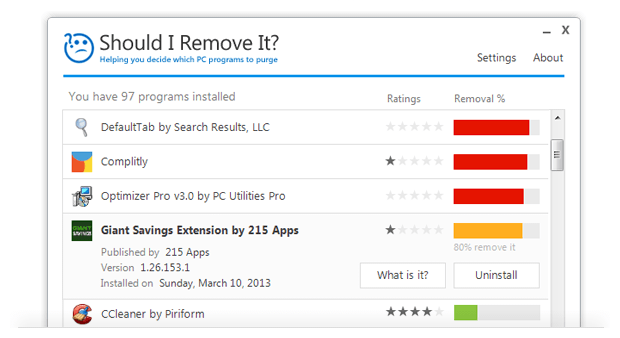
Dopo averlo installato, esegui il programma. Questo avvierà una scansione dei vari software installati sul tuo computer. Troverai una schermata simile a questa:
[/et_pb_text][et_pb_image admin_label=”Immagine” src=”http://www.shouldiremoveit.com/images/home.png” alt=”Immagine presa da www.shouldiremoveit.com” title_text=”Immagine presa da www.shouldiremoveit.com” show_in_lightbox=”off” url_new_window=”off” use_overlay=”off” sticky=”off” align=”center” force_fullwidth=”off” always_center_on_mobile=”on” use_border_color=”off” border_color=”#ffffff” border_width=”1px” border_style=”solid” disabled=”off”]

[/et_pb_image][et_pb_text admin_label=”Testo” background_layout=”light” text_orientation=”center” use_border_color=”off” border_style=”solid” custom_margin=”-20px|||” custom_padding=”|||” disabled=”off”]

Image credits: http://www.shouldiremoveit.com/

[/et_pb_text][et_pb_text admin_label=”Intro Text” background_layout=”light” text_orientation=”left” max_width=”900px” text_font=”PT Serif||||” text_font_size=”20″ text_text_color=”#363636″ text_line_height=”1.5em” use_border_color=”off” border_style=”solid” custom_margin=”30px||0px|” disabled=”off”]

Come puoi vedere, a fianco di ogni programma troverai una piccola valutazione (Rating) e consiglio se rimuoverlo o meno (Removal %).

Se la barra “Removal %” è gialla o rossa, puoi cliccare sul tasto “Uninstall” per rimuovere il programma selezionato. Se invece hai dei dubbi, puoi cliccare sul tasto “What is it?”, e sul tuo browser si aprirà una finestra con una spiegazione abbastanza dettagliata riguardo le funzioni del programma e le sue origini.

[/et_pb_text][/et_pb_column][/et_pb_row][et_pb_row admin_label=”Row” make_fullwidth=”off” use_custom_width=”off” width_unit=”on” custom_width_px=”620px” custom_width_percent=”80%” use_custom_gutter=”off” gutter_width=”3″ custom_padding=”0px||0px|” padding_mobile=”on” allow_player_pause=”off” parallax=”off” parallax_method=”off” make_equal=”off” column_padding_mobile=”on” parallax_1=”off” parallax_method_1=”off” parallax_2=”off” parallax_method_2=”on” parallax_3=”off” parallax_method_3=”on” parallax_4=”off” parallax_method_4=”on” disabled=”off”][et_pb_column type=”4_4″][et_pb_divider admin_label=”Divider” color=”#aeaeac” show_divider=”on” divider_style=”solid” divider_position=”top” divider_weight=”1px” hide_on_mobile=”off” disabled=”off”]

[/et_pb_divider][/et_pb_column][/et_pb_row][et_pb_row admin_label=”Row” make_fullwidth=”on” use_custom_width=”off” width_unit=”on” custom_width_px=”620px” custom_width_percent=”80%” use_custom_gutter=”off” gutter_width=”3″ custom_padding=”50px|||” padding_mobile=”on” allow_player_pause=”off” parallax=”off” parallax_method=”off” make_equal=”off” column_padding_mobile=”on” parallax_1=”off” parallax_method_1=”off” parallax_2=”off” parallax_method_2=”on” parallax_3=”off” parallax_method_3=”on” parallax_4=”off” parallax_method_4=”on” disabled=”off”][et_pb_column type=”4_4″][et_pb_divider admin_label=”Divider” color=”#aeaeac” show_divider=”on” divider_style=”solid” divider_position=”top” divider_weight=”1px” hide_on_mobile=”off” disabled=”off”]

[/et_pb_divider][et_pb_text admin_label=”Step 1″ background_layout=”light” text_orientation=”center” text_font=”PT Serif||||” text_font_size=”32″ text_text_color=”#363636″ text_line_height=”1.3em” use_border_color=”off” border_style=”solid” custom_margin=”16px||30px|” disabled=”off” inline_fonts=”Roboto Light,Open Sans”]

Per oggi è tutto, al prossimo quick tip!

[/et_pb_text][et_pb_divider admin_label=”Divider” color=”#aeaeac” show_divider=”on” divider_style=”solid” divider_position=”top” divider_weight=”1px” hide_on_mobile=”off” disabled=”off”]

[/et_pb_divider][/et_pb_column][/et_pb_row][et_pb_row admin_label=”row” make_fullwidth=”off” use_custom_width=”on” width_unit=”on” custom_width_px=”800px” custom_width_percent=”80%” use_custom_gutter=”off” gutter_width=”3″ padding_mobile=”off” allow_player_pause=”off” parallax=”off” parallax_method=”on” make_equal=”off” column_padding_mobile=”on” parallax_1=”off” parallax_method_1=”on” parallax_2=”off” parallax_method_2=”on” parallax_3=”off” parallax_method_3=”on” parallax_4=”off” parallax_method_4=”on” disabled=”off”][et_pb_column type=”4_4″][et_pb_text admin_label=”Procedimento1″ background_layout=”light” text_orientation=”left” max_width=”900px” text_font=”PT Serif||||” text_font_size=”20″ text_text_color=”#363636″ text_line_height=”1.5em” use_border_color=”off” border_style=”solid” custom_margin=”30px||0px|” disabled=”off”]

Se questa guida ti è stata utile, hai dubbi o domande da farmi, scrivimi sulla pagina Facebook di Next a questo indirizzo e, se ti va, lascia un feedback!

[/et_pb_text][/et_pb_column][/et_pb_row][/et_pb_section][et_pb_section admin_label=”Section” transparent_background=”off” allow_player_pause=”off” inner_shadow=”off” parallax=”off” parallax_method=”on” custom_padding=”54px|0px|0px|0px” padding_mobile=”off” make_fullwidth=”off” use_custom_width=”off” width_unit=”off” make_equal=”off” use_custom_gutter=”off” fullwidth=”off” specialty=”off” disabled_on=”off|off|off” disabled=”off”][et_pb_row admin_label=”Row” make_fullwidth=”off” use_custom_width=”on” width_unit=”on” custom_width_px=”780px” custom_width_percent=”80%” use_custom_gutter=”off” gutter_width=”3″ padding_mobile=”off” allow_player_pause=”off” parallax=”off” parallax_method=”off” make_equal=”off” column_padding_mobile=”on” parallax_1=”off” parallax_method_1=”off” parallax_2=”off” parallax_method_2=”on” parallax_3=”off” parallax_method_3=”on” parallax_4=”off” parallax_method_4=”on” disabled_on=”off|off|off” disabled=”off”][et_pb_column type=”4_4″][et_pb_signup admin_label=”E-Mail Optin” provider=”mailchimp” mailchimp_list=”e64da3ece2″ button_text=”Registrati” use_background_color=”on” background_color=”rgba(12,113,195,0.66)” background_layout=”dark” text_orientation=”left” use_focus_border_color=”off” use_border_color=”off” border_color=”#ffffff” border_width=”1px” border_style=”solid” custom_button=”off” button_text_size=”20″ button_use_icon=”on” button_icon_placement=”right” button_on_hover=”on” button_letter_spacing_hover=”0″ disabled=”off”]

Vuoi leggere in anteprima i nostri articoli?

Iscriviti alla nostra Newsletter!

[/et_pb_signup][/et_pb_column][/et_pb_row][/et_pb_section]

Similar Posts

  • Next Quick Tip #2 – Installa un Software Anti-Virus

    [et_pb_section transparent_background=”off” background_color=”#ffffff” allow_player_pause=”off” inner_shadow=”off” parallax=”off” parallax_method=”off” custom_padding=”||0px|” padding_mobile=”on” make_fullwidth=”off” use_custom_width=”off” width_unit=”on” custom_width_px=”1080px” custom_width_percent=”80%” make_equal=”off” use_custom_gutter=”off” fullwidth=”off” specialty=”off” admin_label=”section” disabled=”off”][et_pb_row make_fullwidth=”on” use_custom_width=”off” width_unit=”off” custom_width_px=”1080px” custom_width_percent=”80%” use_custom_gutter=”off” gutter_width=”3″ custom_padding=”||0px|” padding_mobile=”on” allow_player_pause=”off” parallax=”off” parallax_method=”off” make_equal=”off” column_padding_mobile=”on” parallax_1=”off” parallax_method_1=”off” parallax_2=”off” parallax_method_2=”on” parallax_3=”off” parallax_method_3=”on” parallax_4=”off” parallax_method_4=”on” admin_label=”row” disabled=”off”][et_pb_column type=”4_4″ disabled=”off” parallax=”off” parallax_method=”off” column_padding_mobile=”on”][et_pb_text background_layout=”light” text_orientation=”center” admin_label=”Pre-Title” text_font=”PT Sans|on|||” text_text_color=”#bcbcbc”…

  • Come impostare il backup automatico dei tuoi dati in cinque minuti

    [et_pb_section transparent_background=”off” background_color=”#ffffff” allow_player_pause=”off” inner_shadow=”off” parallax=”off” parallax_method=”off” custom_padding=”||0px|” padding_mobile=”on” make_fullwidth=”off” use_custom_width=”off” width_unit=”on” custom_width_px=”1080px” custom_width_percent=”80%” make_equal=”off” use_custom_gutter=”off” fullwidth=”off” specialty=”off” admin_label=”section” disabled=”off”][et_pb_row make_fullwidth=”on” use_custom_width=”off” width_unit=”on” custom_width_px=”1080px” custom_width_percent=”80%” use_custom_gutter=”off” gutter_width=”3″ custom_padding=”||0px|” padding_mobile=”on” allow_player_pause=”off” parallax=”off” parallax_method=”off” make_equal=”off” column_padding_mobile=”on” parallax_1=”off” parallax_method_1=”off” parallax_2=”off” parallax_method_2=”on” parallax_3=”off” parallax_method_3=”on” parallax_4=”off” parallax_method_4=”on” admin_label=”row” disabled=”off”][et_pb_column type=”4_4″ disabled=”off” parallax=”off” parallax_method=”off” column_padding_mobile=”on”][et_pb_text background_layout=”light” text_orientation=”center” admin_label=”Pre-Title” text_font=”PT Sans|on|||” text_text_color=”#bcbcbc”…

  • Next Quick Tip #4 – Mostra le estensioni dei file su Windows

    [et_pb_section fb_built=”1″ background_color=”#ffffff” custom_padding=”||0px|” padding_mobile=”on” admin_label=”section”][et_pb_row make_fullwidth=”on” custom_padding=”||0px|” padding_mobile=”on” column_padding_mobile=”on” parallax_method_1=”off” admin_label=”row”][et_pb_column type=”4_4″ parallax=”off” parallax_method=”off” column_padding_mobile=”on”][et_pb_text text_orientation=”center” admin_label=”Pre-Title” text_font=”PT Sans|on|||” text_text_color=”#bcbcbc” text_letter_spacing=”2px” custom_margin=”||0px|” custom_padding=”||0px|”] Sei sicuro che il tuo computer sia pulito e sotto controllo? Scopriamolo! [/et_pb_text][et_pb_text text_orientation=”center” max_width=”800px” admin_label=”Titolo articolo” header_font=”|on|||” header_font_size=”40px” text_font=”PT Sans||||” text_font_size=”72″ text_font_size_tablet=”52″ text_text_color=”#1d1d1d” text_line_height=”1.1em” custom_margin=”18px||80px|”] I 7 trucchi per tenere…

  • Next Quick Tip #5 – Usa Google Chrome e installa queste estensioni

    [et_pb_section fb_built=”1″ background_color=”#ffffff” custom_padding=”||0px|” padding_mobile=”on” admin_label=”section”][et_pb_row make_fullwidth=”on” custom_padding=”||0px|” padding_mobile=”on” column_padding_mobile=”on” parallax_method_1=”off” admin_label=”row”][et_pb_column type=”4_4″ parallax=”off” parallax_method=”off” column_padding_mobile=”on”][et_pb_text text_orientation=”center” admin_label=”Pre-Title” text_font=”PT Sans|on|||” text_text_color=”#bcbcbc” text_letter_spacing=”2px” custom_margin=”||0px|” custom_padding=”||0px|”] Sei sicuro che il tuo computer sia pulito e sotto controllo? Scopriamolo! [/et_pb_text][et_pb_text text_orientation=”center” max_width=”800px” admin_label=”Titolo articolo” text_font=”PT Sans||||” text_font_size=”72″ text_font_size_tablet=”52″ text_text_color=”#1d1d1d” text_line_height=”1.1em” header_font=”|on|||” header_font_size=”40px” custom_margin=”18px||80px|”] I 7 trucchi per tenere…

  • Next Quick Tip #6 – Fai attenzione quando apri le e-mail

    [et_pb_section bb_built=”1″ admin_label=”section” custom_padding=”||0px|” padding_mobile=”on”][et_pb_row admin_label=”row” make_fullwidth=”on” custom_padding=”||0px|” padding_mobile=”on” column_padding_mobile=”on” parallax_method_1=”off”][et_pb_column type=”4_4″][et_pb_text admin_label=”Pre-Title” text_orientation=”center” text_font=”PT Sans|on|||” text_text_color=”#bcbcbc” text_letter_spacing=”2px” custom_margin=”||0px|” custom_padding=”||0px|”] Sei sicuro che il tuo computer sia pulito e sotto controllo? Scopriamolo! [/et_pb_text][et_pb_text admin_label=”Titolo articolo” text_orientation=”center” max_width=”800px” text_font=”PT Sans||||” text_font_size=”72″ text_font_size_tablet=”52″ text_text_color=”#1d1d1d” text_line_height=”1.1em” header_font=”|on|||” header_font_size=”40px” custom_margin=”18px||80px|”] I 7 trucchi per tenere protetto il tuo PC…

  • Next Quick Tip #3 – Rimuovi periodicamente i file temporanei

    [et_pb_section transparent_background=”off” background_color=”#ffffff” allow_player_pause=”off” inner_shadow=”off” parallax=”off” parallax_method=”off” custom_padding=”||0px|” padding_mobile=”on” make_fullwidth=”off” use_custom_width=”off” width_unit=”on” custom_width_px=”1080px” custom_width_percent=”80%” make_equal=”off” use_custom_gutter=”off” fullwidth=”off” specialty=”off” admin_label=”section” disabled=”off”][et_pb_row make_fullwidth=”on” use_custom_width=”off” width_unit=”off” custom_width_px=”1080px” custom_width_percent=”80%” use_custom_gutter=”off” gutter_width=”3″ custom_padding=”||0px|” padding_mobile=”on” allow_player_pause=”off” parallax=”off” parallax_method=”off” make_equal=”off” column_padding_mobile=”on” parallax_1=”off” parallax_method_1=”off” parallax_2=”off” parallax_method_2=”on” parallax_3=”off” parallax_method_3=”on” parallax_4=”off” parallax_method_4=”on” admin_label=”row” disabled=”off”][et_pb_column type=”4_4″ disabled=”off” parallax=”off” parallax_method=”off” column_padding_mobile=”on”][et_pb_text background_layout=”light” text_orientation=”center” admin_label=”Pre-Title” text_font=”PT Sans|on|||” text_text_color=”#bcbcbc”…

Leave a Reply

Your email address will not be published. Required fields are marked *